Time-based
Activities scheduled at a given frequency, with periodicity defined freely in days: weekly, monthly, biannual, annual…
MACHINA WEB offers all the features needed for professional maintenance management, in a single integrated platform.
Request Demo
Quick entry of maintenance requests from PC, tablet or smartphone, with asset identification via barcode or QR code.
Real-time notifications to technicians, supervisors and external contractors.

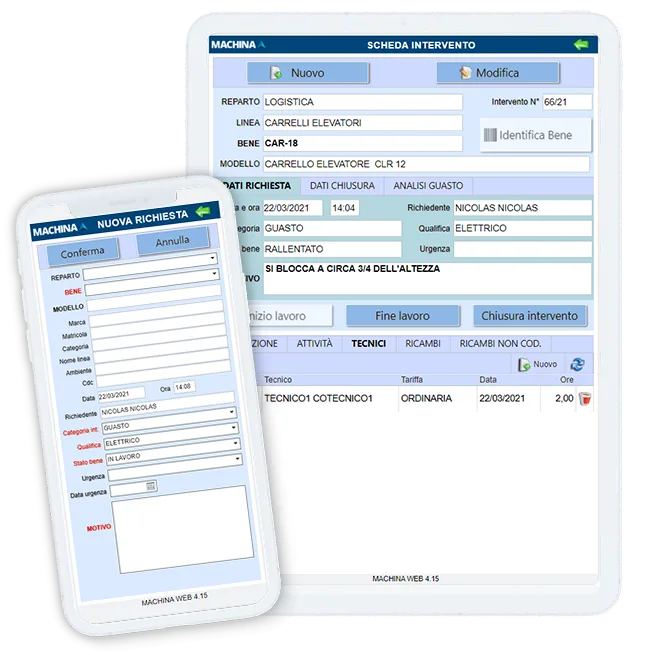
Any user can submit a maintenance request simply and intuitively, with no training required. From a smartphone or tablet, the machine is identified via barcode or QR code and photos can be attached to document the request.
Each user's visibility can be limited to the machines in their department or facility.
Through the Automation module it is possible to configure the recipients of each request: internal technicians, department supervisors or external maintenance companies.
Every communication is recorded, ensuring full traceability and faster response times.

MACHINA WEB guides you through preventive maintenance scheduling: in one minute you can assign a plan to a group of assets and set the deadlines. You do it once — the system automatically generates work orders for all future years.
Activities scheduled at a given frequency, with periodicity defined freely in days: weekly, monthly, biannual, annual…
Activities scheduled based on actual usage: plant working hours, vehicle kilometres travelled — with any unit of measure.
Work orders generated automatically when a parameter goes outside the set range: temperature, pressure, vibrations or any other measurable value.
Total Productive Maintenance: technicians and operators take care of daily machine upkeep — cleaning, lubrication and inspection — to reduce breakdowns and improve reliability.
Select the machines or groups for which you want to schedule maintenance.
Associate the maintenance plan and set the date of the first activity.
Optionally, assign a technician or an external company to carry out those activities.
Done. MACHINA WEB automatically generates all work orders — for years to come, with no manual intervention.
Predictive maintenance continuously monitors machine conditions through connected sensors and systems — IoT, MES, SCADA — and centralises the collected data in the CMMS. Specific algorithms process this information to anticipate failures before they occur, making it possible to plan the intervention at the most appropriate time: without waiting for a scheduled deadline, without waiting for a machine breakdown.
Detects anomalies in bearings, gears and rotating shafts.
Identifies leaks, cavitation or mechanical wear from the sound emitted by the machine.
Detects overheating in electrical panels and mechanical components (ref. UNI 10147).
Compared to condition-based maintenance — which acts when a parameter exceeds a defined threshold — predictive maintenance goes further: it uses artificial intelligence, machine learning and big data to correlate multiple variables simultaneously and estimate the moment of failure before it occurs. It is one of the enabling technologies of Industry 4.0 applied to industrial maintenance management.
Predictive maintenance is not a feature you switch on: it is a project built together. It requires knowledge of the machines involved, the definition of critical parameters to monitor and, ideally, a body of historical data on which to calibrate the analysis models. Studio ARCHIMEDE supports the client throughout this phase, to identify the most critical machines and set up the analytical logic best suited to the specific production environment.
Complete work order management with planning, technician and spare parts assignment, time and cost tracking, and photo attachments.


MACHINA WEB includes complete spare parts warehouse management fully integrated with maintenance. Each item has real-time stock levels, movement history, supplier equivalence codes and location across warehouses.
The extensive analytical dashboard of MACHINA WEB provides a real-time view of maintenance activities and costs. Data from every work order feeds over 300 families of customizable reports, exportable as PDF, to analyse times, spare parts usage and technician workloads.
The main KPIs — MTBF, MTTR and OEE — are calculated automatically in real time and visible in the dashboard, with configurable filters by department, machine or reference period.

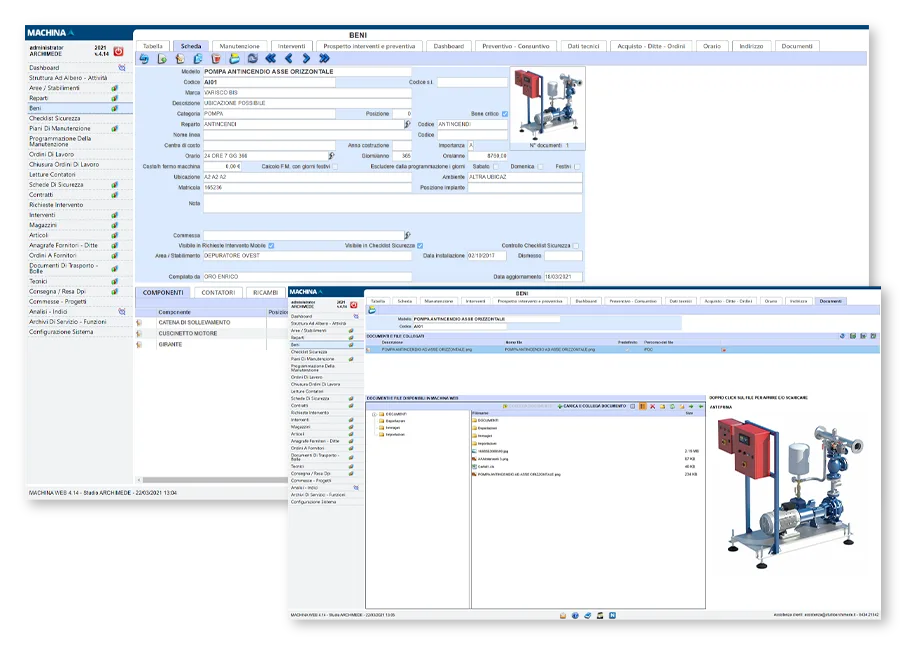
Every MACHINA WEB record — assets, maintenance plans, work orders, spare parts — can have attachments of any type: PDF, Word, Excel, MSG, AutoCAD, IFC and many more.
The built-in viewer lets you open and browse files directly in the browser, including BIM, CAD and Revit formats. Documents are stored centrally and accessible to all authorised users.
Want to review all the features at your own pace or share them with your team? Download the full PDF brochure.
Management of maintenance projects with interactive Gantt, task dependencies and percentage progress tracking.
Resource allocation, budget control and real-time cost tracking.
Automatic email notifications for every event: maintenance requests created and assigned, closed work orders, deadlines, purchase orders, and more.
Configurable workflows to automate maintenance processes.
REST API for integration with business ERP systems (including Infor LN), MES and SCADA systems. Dedicated APIs allow IoT devices to send counter readings and open maintenance requests automatically — native connectivity for the Industry 4.0 ecosystem.
View assets, plants and work requests on an interactive map. Quickly locate asset positions and manage interventions directly from the map.
Customizable approval workflows to convert purchase requests into supplier orders and to activate projects, with automatic email notifications.
Full traceability of tools: assignment to technicians, calibration deadlines and usage history for every piece of equipment.
Ogni funzione pensata per ridurre i fermi e aumentare la produzione.
Request a personalized 15-minute presentation. We will show you how MACHINA WEB adapts to your company — no commitment.